
How to Export ChatGPT Group Chats to Notion
ChatGPT group chats are useful for collaborative brainstorming, team decisions, and shared research. They are also harder to archive than regular one-to-one chats because the conversation includes multiple speakers and a different URL structure.
ChatGPT to Notion supports exporting group chat pages to Notion while preserving message order and author names.
When This Workflow Helps
Use this workflow when you need to:
- Save team discussions from ChatGPT group chats
- Keep each participant’s messages readable in Notion
- Turn a group chat into meeting notes or project documentation
- Back up group chat history before it becomes difficult to find
Export a Single Group Chat
- Open the ChatGPT group chat page.
- Make sure the full conversation is loaded.
- Click the ChatGPT to Notion extension.
- Choose your Notion database.
- Start the export.
The saved Notion page keeps the conversation structure so you can review who said what later.
Batch Sync Recent Group Chats
For recurring collaboration, use batch sync:
- Open the extension options page.
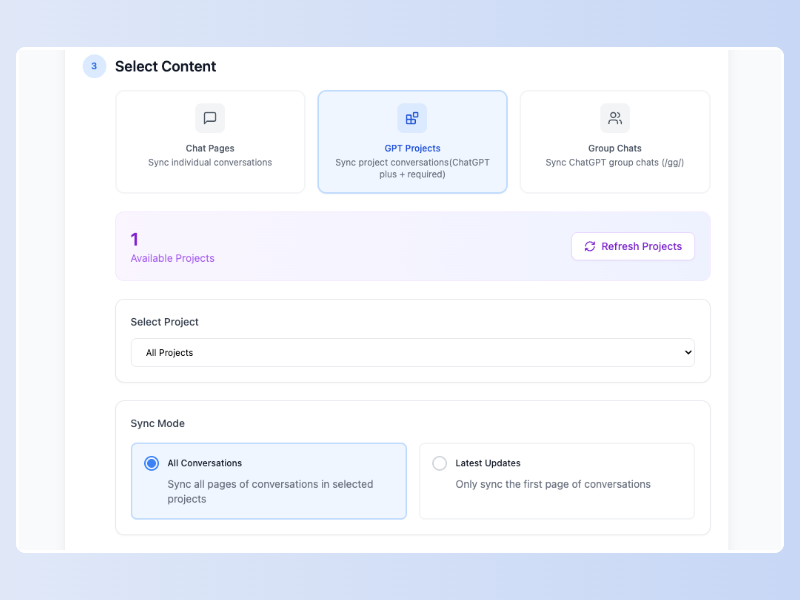
- Choose the group chats sync mode.
- Select recent group chats or all available group chats.
- Keep “skip synced records” enabled if you do not want duplicates.
- Start sync and wait for the summary.
For detailed settings, see the batch sync documentation.
Recommended Notion Properties
Create a Notion database with these fields:
| Property | Type | Purpose |
|---|---|---|
| Title | Title | Group chat topic |
| Source URL | URL | Original ChatGPT group chat link |
| Export Date | Date | When the backup was created |
| Type | Select | Group Chat |
| Participants | Multi-select | People involved |
| Project | Relation or Select | Related workspace or client |
Best Practices
- Export important group chats soon after the discussion ends.
- Use tags like
Group Chat,Decision,Research, orMeeting Notes. - Link exported chats from your project wiki or meeting database.
- Use selective copy for only the messages that matter.
FAQ
Can I keep author names?
Yes. ChatGPT to Notion is designed to keep group chat authors and message order when exporting supported group chat pages.
Can I export all group chats?
You can batch sync group chats from the extension options page. Large histories may take longer, so start with recent group chats first.
Does this work with regular ChatGPT chats too?
Yes. The same extension supports regular chats, Projects, Deep Research, and TextDocs. Start from the ChatGPT to Notion product page.