
ChatGPT to Notion
Backup, export, and download your ChatGPT history to Notion. The ultimate Chrome Extension to bulk export your entire library—including Group Chats, Projects, and Deep Research—in a single click.
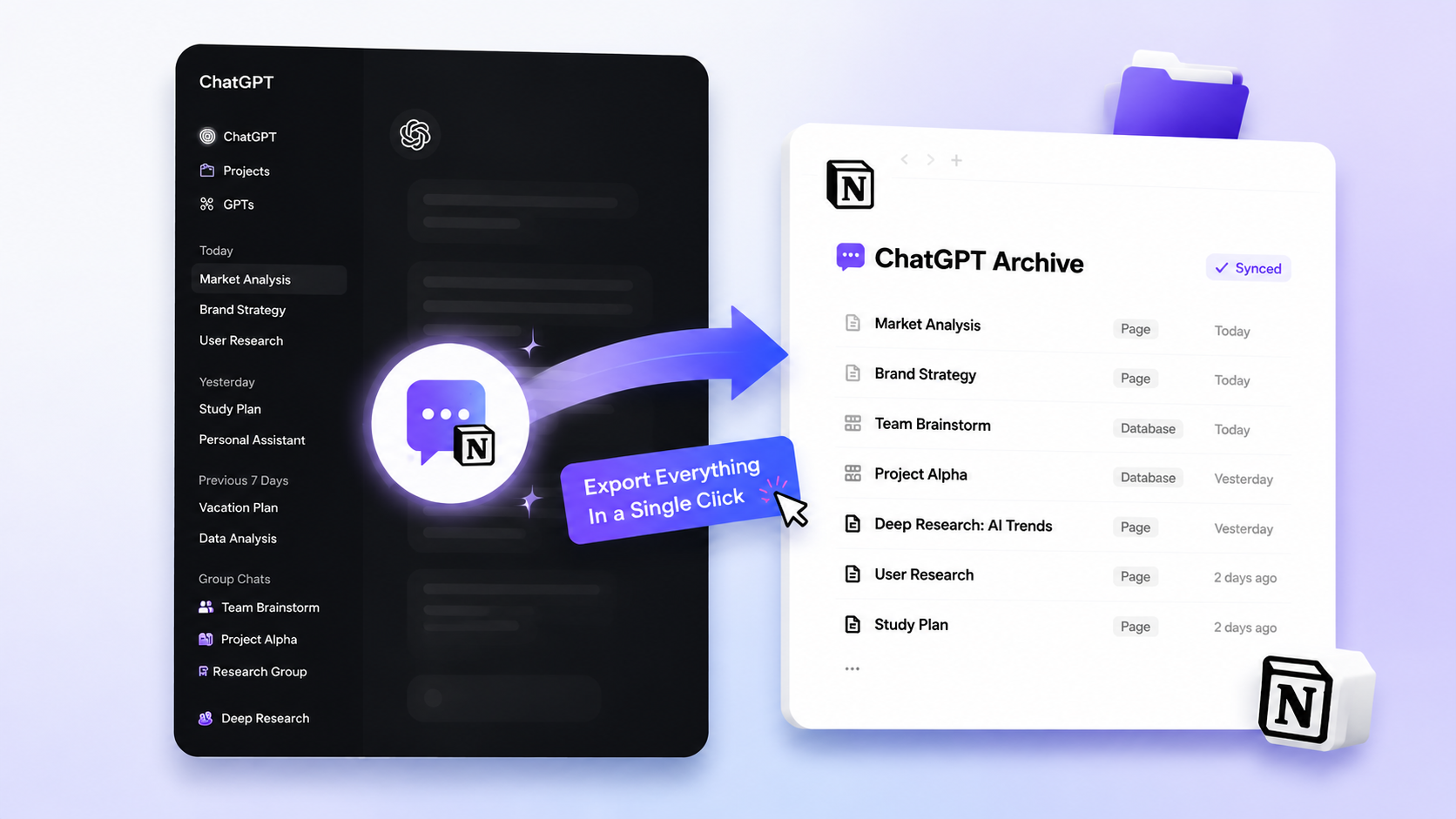
People Love ChatGPT to Notion because it's fast, reliable, and keeps formatting intact.
Compatibility matrix
What ChatGPT to Notion can export
A practical support table for real content types and destination behavior.
| Content type | Support | Export result | Notes |
|---|---|---|---|
| Normal ChatGPT conversations | Supported | Saved as searchable Notion pages with the original conversation URL. | Use one-click export for the current chat or batch sync for history. |
| ChatGPT Projects | Supported | Saved with project context and Notion properties for organization. | Best for product planning, client research, and project archives. |
| ChatGPT Group Chats | Supported | Messages are exported with author names and message order preserved. | Group chat exports can be selected or synced in batch mode. |
| Deep Research final reports | Supported | Long reports can be exported into structured Notion content or child pages. | Use this for research archives that need headings, lists, tables, and source context. |
| TextDocs and long documents | Supported | Large document-style outputs can be organized as Notion sub-pages. | Useful when a generated document is the main deliverable. |
| Code blocks | Supported | Code formatting is preserved in Notion-friendly blocks. | Verify language labels after export if the source chat used custom formatting. |
| Tables | Supported | Markdown-style tables are converted into readable Notion content. | Table rendering has dedicated fixes in the product changelog. |
| Images and inline media | Not supported | ChatGPT to Notion does not insert images into Notion pages because of Notion API constraints. | Use ChatGPT to Obsidian or ChatGPT to PDF when image export is required. |
| LaTeX and math | Partial | Math-heavy content is preserved as structured text where possible. | Review final rendering in Notion for complex formulas. |
| Long conversation history | Supported | Batch export and sync are designed for large libraries. | Use request delay and smaller batches if ChatGPT slows down or rate limits. |
| 429 rate limits | Protected | Delay controls and retry-friendly batch workflows reduce failed exports. | Increase request delay before retrying a large history export. |
Output proof
Real export examples
Use these examples to verify what exported files, folders, or destination pages look like before installing.
Notion conversation page
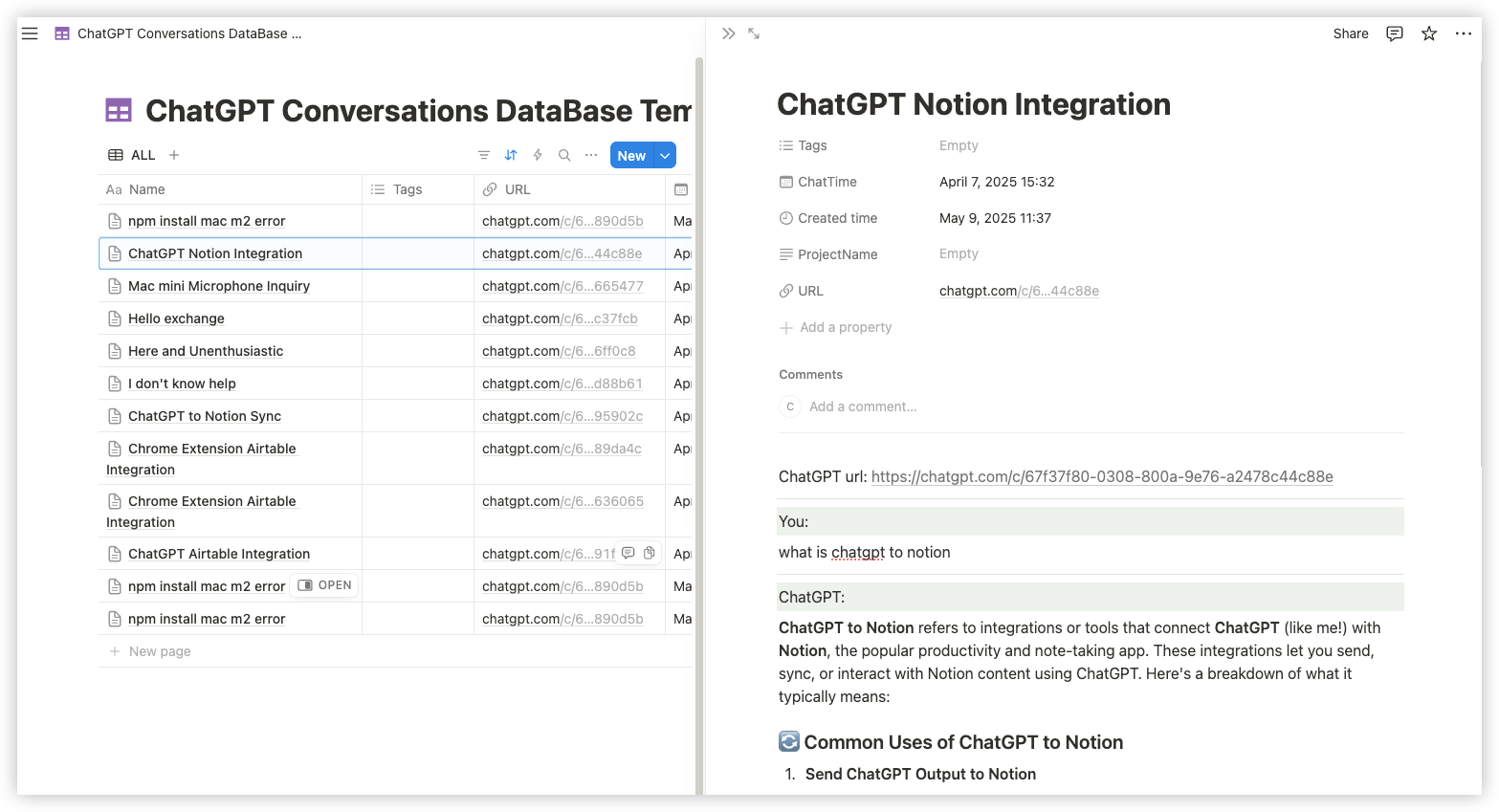
Exported ChatGPT conversation in Notion with searchable title, metadata, and formatted content.
Batch export progress
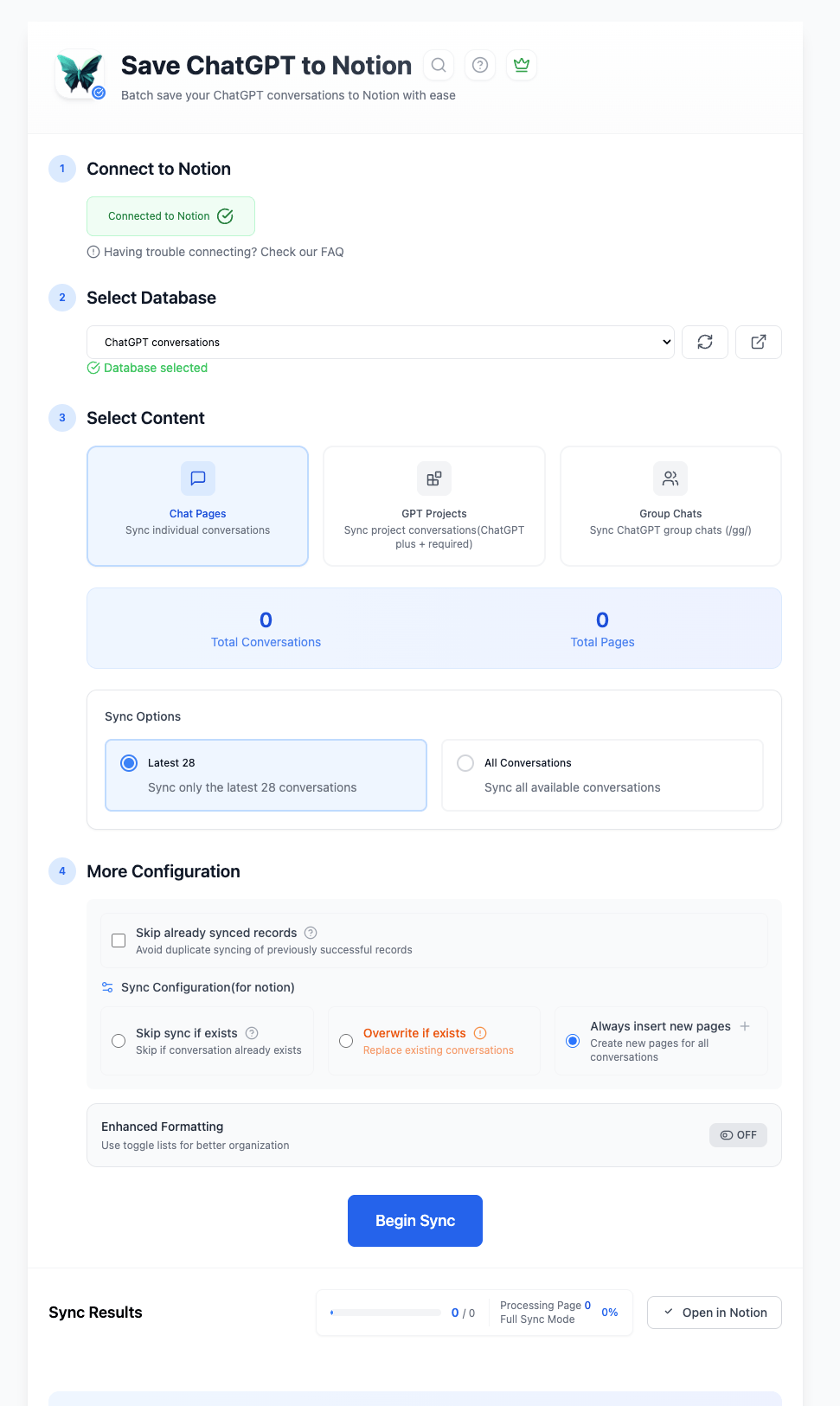
Batch workflow for saving multiple ChatGPT conversations into the selected Notion database.
30-second before/after GIF
A short capture showing one-click export from ChatGPT and the resulting Notion page.
See it in Action
Key Features
Auto-Sync & Batch Backup
Stop saving chats one by one. Bulk export your entire history in one go, or enable Auto-Sync to automatically capture new conversations to Notion every few hours. Build a complete archive hands-free.
Group Chats & Projects Support
Capture the full context of your work. We support full export for ChatGPT Group Chats (keeping author names) and Projects. Turn scattered team discussions into organized documentation.
Deep Researcher & TextDocs
Preserve complex reports instantly. Seamlessly export Deep Researcher reports and TextDocs content as structured sub-pages in Notion. No copy-paste errors. No broken formatting.
Key Features of ChatGPT to Notion
Everything you need to organize your ChatGPT conversations quickly and efficiently.
Smart Formatting
Preserves Markdown, Code Blocks, LaTeX, and Tables for Notion-friendly archives. Image export is available in ChatGPT to Obsidian and ChatGPT to PDF, not ChatGPT to Notion.
Selective Export
Don't need the whole chat? Select specific Q&A turns or message segments to save relevant info only.
Versioning Control
Choose to skip, overwrite, or duplicate existing pages when syncing. You have full control.
Sub-page Support
Automatically organizes TextDocs and lengthy reports as neat sub-pages in Notion.
One-Click Save
Just need to save the current chat? We do that too—instantly, with a single click.
Auto-Tagging
Exports are automatically tagged with "Group Chat", "Project", or "Selection" for easy filtering.
Export to Download
Need a local file? Once synced to Notion, easily download your chats as PDF, HTML, or Markdown files for offline storage.
Local & Private
Your data flows directly from your browser to Notion. No middleman servers.
Known limits
Export boundaries and fixes
Clear limits build trust. These are the cases to check before running large exports.
Images are not exported to Notion
ChatGPT to Notion saves text, structure, code blocks, tables, metadata, Projects, Group Chats, and Deep Research content, but it does not insert ChatGPT images into Notion pages because of Notion API constraints.
Use ChatGPT to Obsidian for local Markdown/image workflows, or ChatGPT to PDF when you need a visual archive.
Troubleshooting guideVery large batches can trigger rate limits
Large history exports send many requests and can hit ChatGPT or Notion throttling behavior.
Increase request delay, retry in smaller batches, and use the 429 troubleshooting guide.
Troubleshooting guideComplex formulas should be checked after export
Simple math and structured text usually transfer cleanly, but complex LaTeX rendering can vary after Notion import.
Review math-heavy exports and keep a sample output page for future QA.
Troubleshooting guideNotion database mapping depends on your workspace setup
Title, URL, tag, and status fields work best when the destination database has clear properties.
Use the connection and database setup docs before running a large sync.
Troubleshooting guideHow it Works
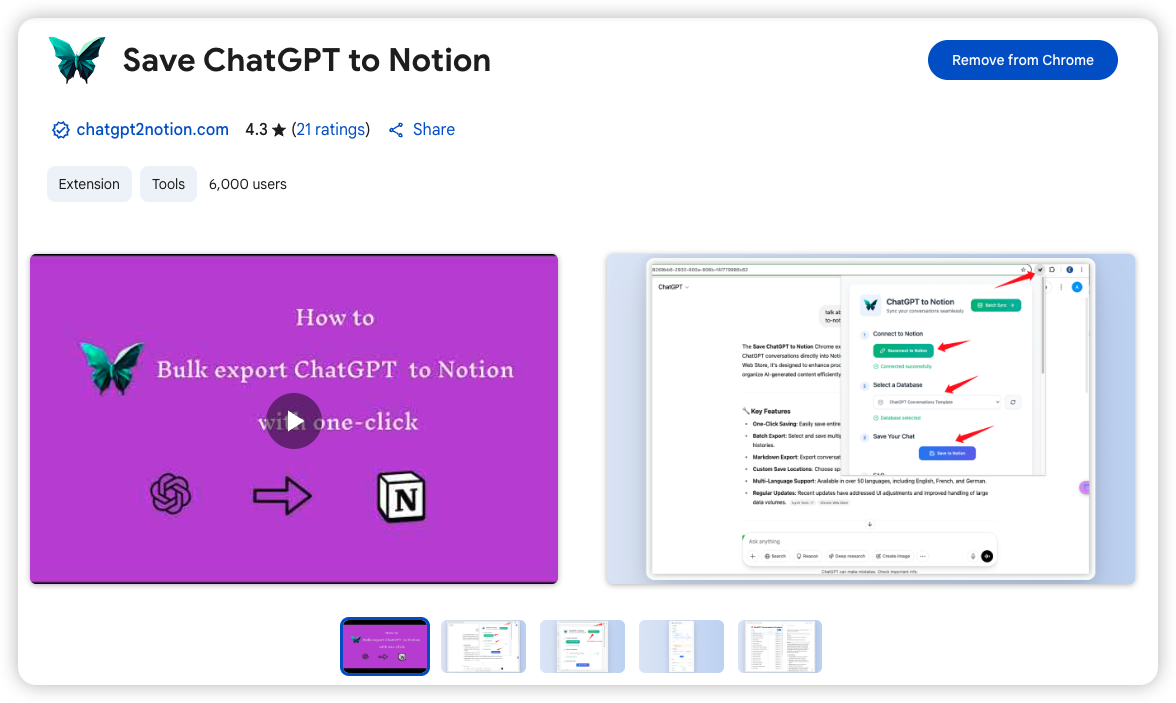
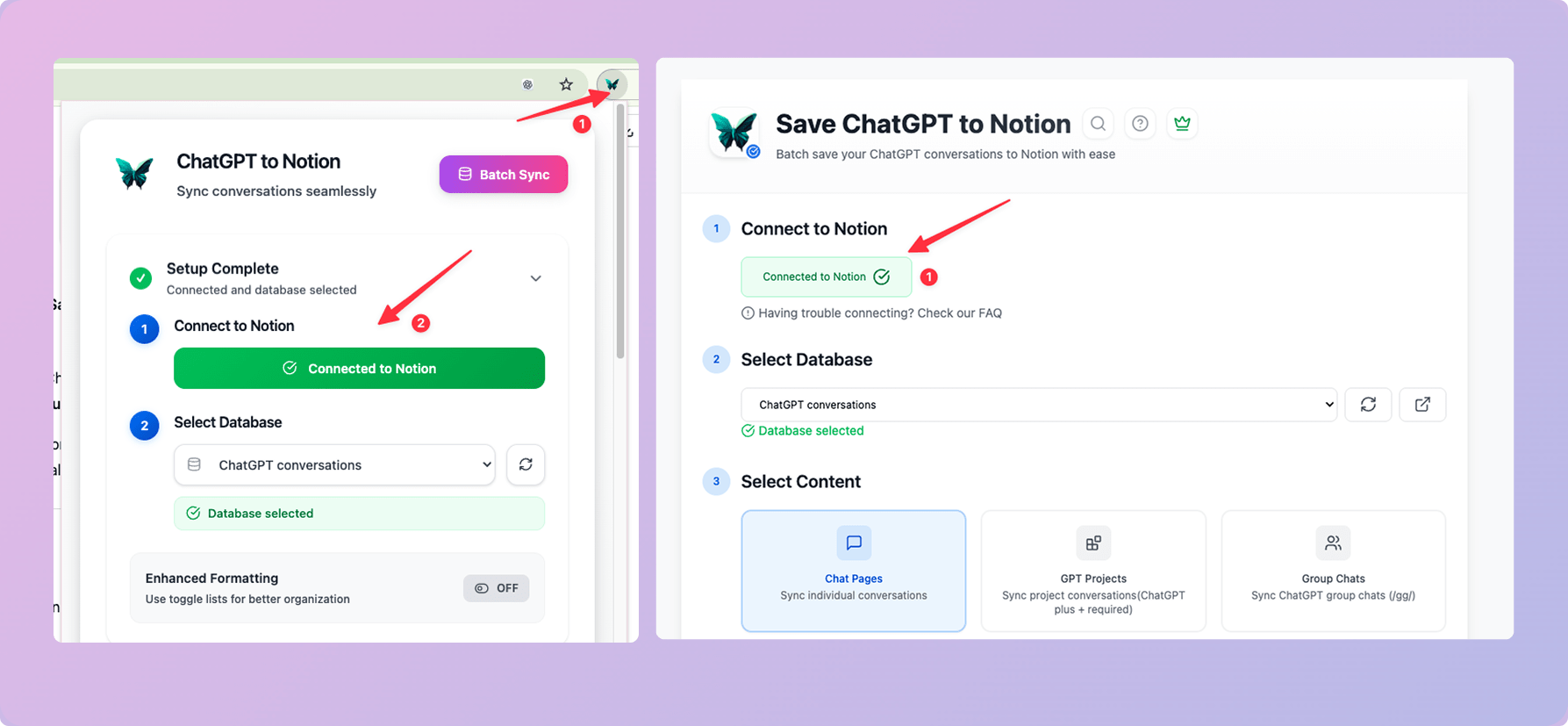
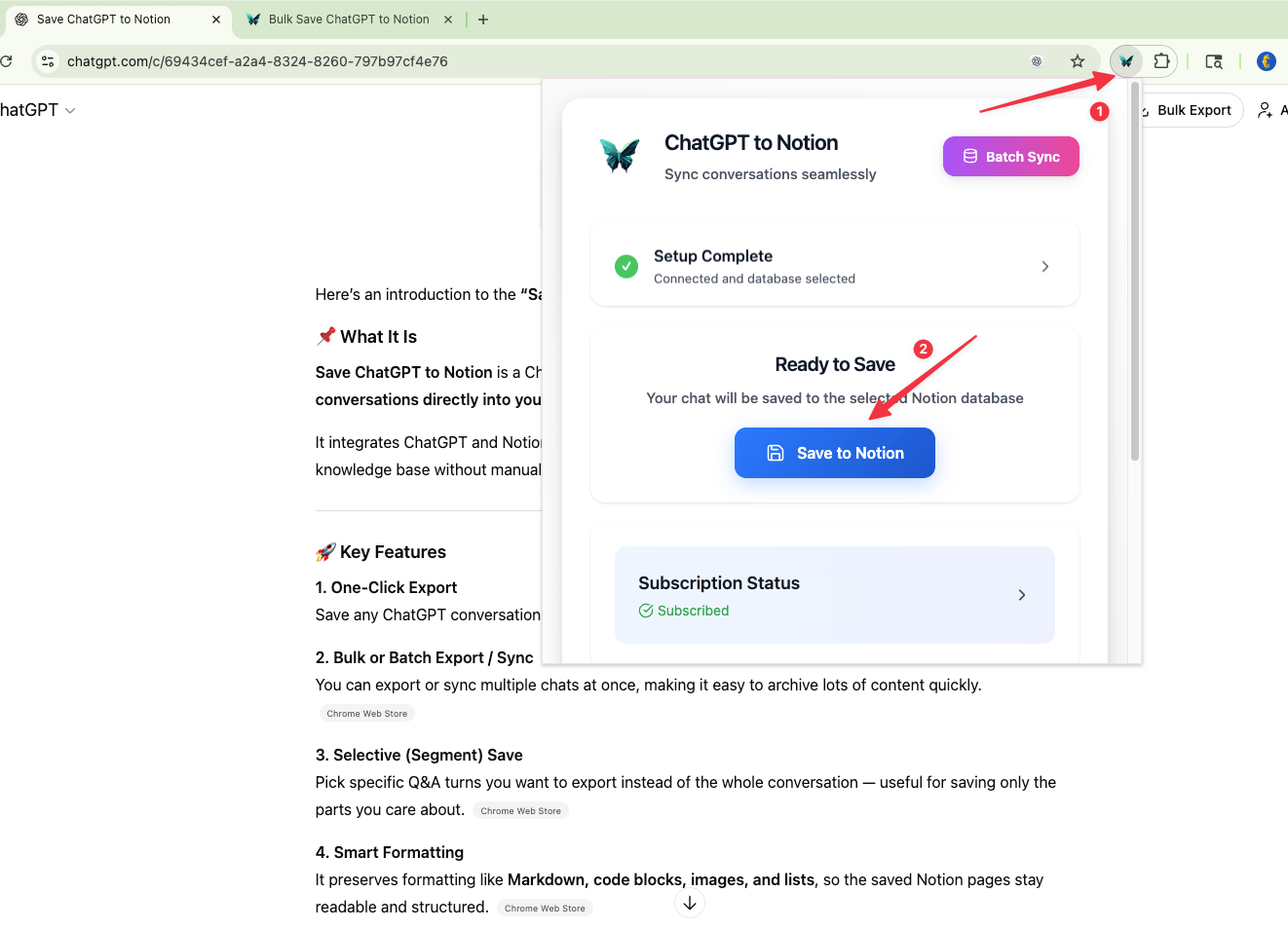
What Users Say About ChatGPT to Notion
Real workflows, backed up to Notion.
"Batch sync keeps my chats and research notes backed up in Notion — searchable and formatted without cleanup."
"Selective export is perfect for long threads. I save only key decisions, and group chats keep authors and order intact."
"Code blocks and tables export cleanly to Notion. One click and the technical notes are ready to share with my team."
"I export study sessions to Notion and use Copy as Markdown to grab important group chat messages instantly."
"Projects sync helps our team stay organized. Skip/overwrite/duplicate makes updates predictable without creating mess."
"Exporting to Notion gives me a durable archive I can tag, search, and download later via Notion's native export."
Related resources ChatGPT to Notion
Use these guides and docs to solve common export, backup, and troubleshooting workflows.
Guides
How to export ChatGPT to Notion
A complete setup guide for saving ChatGPT conversations into a Notion database.
Batch export ChatGPT conversations
Learn when batch export is useful and how to avoid formatting and rate-limit issues.
Export ChatGPT Deep Research to Notion
Preserve long Deep Research reports as reusable Notion research assets.
Fix code formatting in exported chats
Understand how code blocks and technical formatting should be preserved in exported ChatGPT conversations.
ChatGPT to Notion vs Zapier
Compare a dedicated browser extension with no-code automation workflows.
Back up ChatGPT history to Notion
Build a searchable archive before chats are deleted, renamed, or lost.
What's New
🚀 NEW: Auto-Sync to Notion. Schedule automatic backups (Daily/Hourly). Improved Notion API stability.
🚀 NEW: ChatGPT Group Chats export & Copy message as Markdown button.
🐛 Fixed: Markdown table rendering issues.
Frequently Asked Questions About ChatGPT to Notion
Have another question? Contact us on Discord or by email.
How do I backup my entire ChatGPT history?
Use our Batch Sync feature. It acts as a full backup tool, allowing you to archive thousands of conversations, including Group Chats, to Notion in minutes. This creates a complete backup of your ChatGPT history that you can search and organize.
Can I download ChatGPT chats as PDF?
Yes. Our extension exports the chat to Notion first. From there, you can use Notion's built-in feature to download the page as a clean, formatted PDF or Markdown file for offline storage.
How does ChatGPT to Notion work?
Our extension connects to both ChatGPT and Notion through secure OAuth2 authentication. When you export a chat, the extension captures the content and saves it to your selected Notion database.
Does it support ChatGPT Group Chats?
Yes. You can export full group chat history from /gg/ pages to Notion, keeping authors and message order.
Can I export only part of a chat?
Yes. In 1:1 chats you can select specific Q&A turns; in group chats you can select specific messages. Exports are auto-tagged (Part / Group Chat / Selection) for easy filtering.
Can I batch sync chats (including Group Chats)?
Yes. Batch sync saves multiple chats in bulk, and you can sync the latest group chats (default 5) or sync all group chats (capped).
Can I copy a group chat message?
Yes. Each group chat message has a Copy button that copies raw Markdown to your clipboard.
Does it support Deep Researcher and TextDocs?
Yes. You can export Deep Researcher document content to Notion with formatting preserved, and export TextDocs tool documents as sub-pages.
What happens if I try to save a conversation that already exists in Notion?
You have three options: skip (leave the existing entry unchanged), overwrite (replace the existing entry), or duplicate (create a new entry). You can configure these options in the extension settings.
How secure is my data?
We take security seriously. The extension uses OAuth2 authentication to securely connect to your Notion account, and we never store your conversation data on our servers. All data transfers happen directly between ChatGPT and your Notion account.
Unlock Unlimited Power
Batch export 100+ chats, Auto-Sync, and priority support with Universal Pass.
Get Universal Pass