
How to Export ChatGPT Projects
Export ChatGPT Projects into Notion or PDF, then keep optional Markdown notes for long-running project conversations that need local backup.
Guide summary
- Search intent
- Commercial guide intent: users want a reliable way to export ChatGPT Projects.
- Best next step
- Try ChatGPT to Notion
- Topics
- ChatGPTProjectsExportNotionObsidianPDF
The best way to export ChatGPT Projects is to treat each project like a durable workspace, not like a temporary chat folder. Export the conversations that contain decisions, research, prompts, and deliverables into Notion for structured retrieval or PDF for clean record keeping. If you also need local ownership, keep a Markdown or Obsidian note layer for selected project notes after the export. If you only leave the work inside the Projects sidebar, useful context becomes harder to search, reuse, and audit over time.
Table of contents
- Why ChatGPT Projects are worth exporting
- Best export formats for project work
- Step-by-step workflow
- Folder and database structure
- Troubleshooting
- FAQ
Why ChatGPT Projects are worth exporting
ChatGPT Projects are usually where the valuable work lives. A normal one-off chat might answer a single question. A project gathers repeated reasoning around one client, one product, one research theme, or one operating process. That is exactly the kind of material that gets expensive to lose.
Projects often hold:
- research threads that explain why a decision was made
- draft iterations for landing pages, emails, or documents
- prompt patterns that get refined over many sessions
- code discussions that fix the same system repeatedly
- notes that need to move into a team wiki or second brain
The risk is not only deletion. The bigger issue is retrieval. Three weeks later, you may remember that the answer existed somewhere inside a project, but not which conversation, which title, or which turn. Exporting turns project knowledge into something you can search outside ChatGPT.
If the project is team-facing or needs metadata, ChatGPT to Notion is usually the best destination. If you need a stable handoff artifact, ChatGPT to PDF is the simplest option. If you want a local-first PKM workflow, use ChatGPT to Obsidian for Markdown notes you can organize alongside the project archive.
Best export formats for ChatGPT Projects
| Format | Best for | Why it works well for Projects | Watch out for |
|---|---|---|---|
| Notion | Shared workspaces, client projects, research databases | Properties, filters, linked docs, collaboration | Review formatting on long chats |
| Obsidian / Markdown | Companion notes, local backups, developer notes | Portable text files, vault structure, backlinks | Treat it as the local note layer unless your current export workflow supports Projects directly |
| Reviews, compliance copies, deliverables, offline archives | Stable layout and easy sharing | Harder to edit or re-tag later | |
| HTML | Browser-readable local archive | Familiar page-like format | Less common in project knowledge systems |
For most people, the strongest setup is to export the working copy into Notion and keep a PDF or local Markdown backup for critical project notes.
Step-by-step workflow
1. Decide what should count as export-worthy
Do not export every project conversation blindly on day one. Start with the threads that have long-term value:
- final decisions
- reusable prompts
- research summaries
- implementation discussions
- client-specific strategy
- code or SOP explanations
If a conversation would be annoying to recreate, it belongs in the export queue.
2. Pick the destination before exporting
The destination should reflect how the project will be used later.
- Use Notion if the project needs status, owners, topics, or sharing.
- Use Obsidian or Markdown if selected project notes also belong in a local vault.
- Use PDF if the project output is mostly reviewable text that needs a fixed copy.
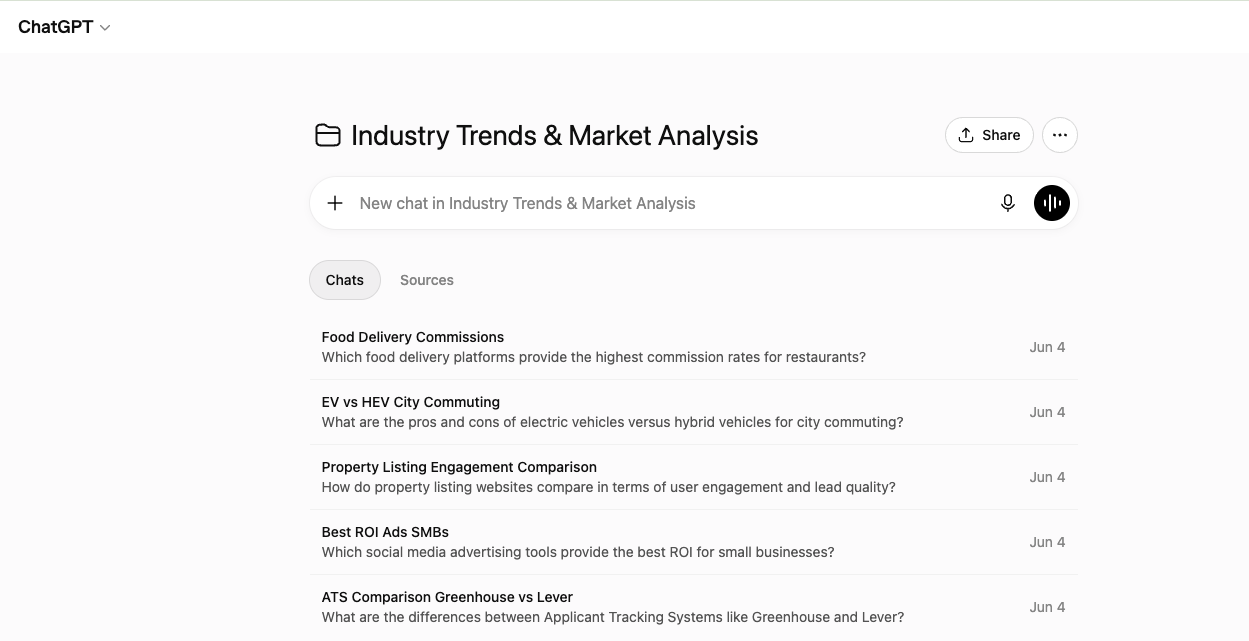
3. Export from the Project mode
ChatGPT to Notion and ChatGPT to PDF document Project-type exports in their batch workflows. Open the export flow, switch from regular chat pages to the Projects mode, then choose one specific project or all projects depending on your goal.
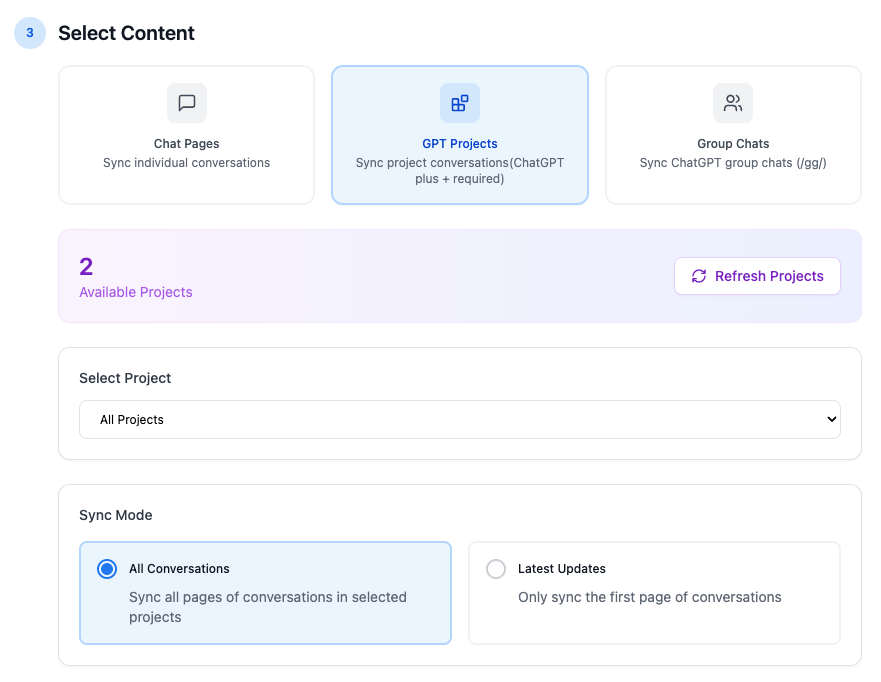
A practical starting pattern:
- select one project
- export the first page or a smaller batch first
- inspect the output
- scale to all pages only after the structure looks right
This is safer than firing a large export before you verify titles, timestamps, and organization.
4. Keep the project name in the exported record
The project label is part of the retrieval value. If the destination allows metadata, keep the project name as a property, tag, or frontmatter field. That lets you answer questions like:
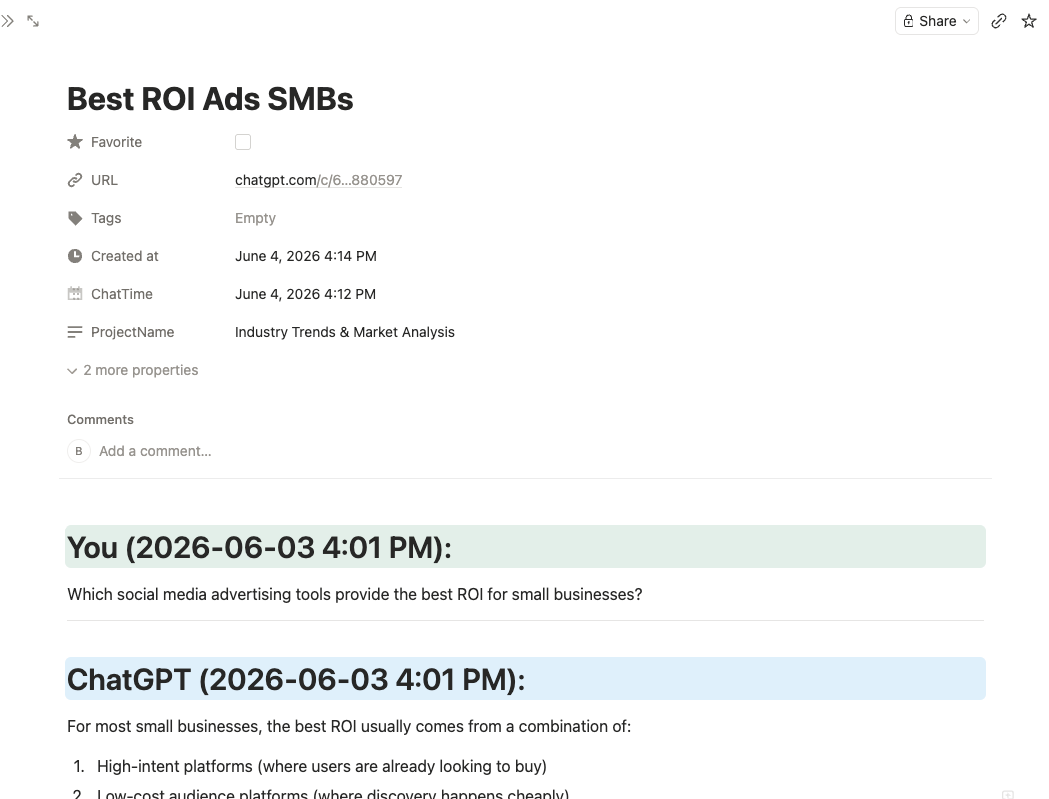
- Which conversations belong to the Q3 launch project?
- Which AI notes came from the Acme client workspace?
- Which project has the most unfinished research exports?
Without a project label, exported files quickly become generic chat notes.
5. Verify the structure after export
Open the exported result and check:
- the conversation title
- the project label
- message order
- code blocks and tables
- timestamps or dates
- links back to the original chat when available
For a long-running project, verify one export sample before continuing with the full batch.
6. Add a lightweight review routine
Exporting is more useful when it becomes a routine. A weekly or milestone-based review works well:
- after a research sprint
- before shipping a feature
- after a client strategy session
- at the end of each week
This keeps the project archive current instead of turning it into a large cleanup problem later.
Recommended folder or database structure
For Notion, one database often works better than separate databases for every project. Recommended properties:
- Title
- Project
- Topic
- Status
- Source tool
- Export date
- Original chat URL
- Format
Good status values:
- Captured
- Needs summary
- Reusable
- Final
- Archived
For Obsidian or Markdown companion notes, try a structure like:
chatgpt-projects/product-launch/chatgpt-projects/client-strategy/chatgpt-projects/research/chatgpt-projects/ops/
Add one short summary paragraph at the top of the most important exported conversations. That saves time when you revisit them later.
Common mistakes to avoid
Exporting too much too early
A giant archive is not automatically useful. Start with the project threads that contain durable work, then expand.
Using vague titles
Project ideas is not a good export name. AI Export Hub pricing objections analysis is much better.
Keeping no local fallback for critical work
If a project drives revenue, research, or client delivery, use more than one export destination over time. Notion for working knowledge plus Markdown or PDF for local backup is a sensible pattern.
Forgetting to review long conversations
Project conversations are often long. Review one or two large exports early so you catch formatting issues before you export dozens more.
Troubleshooting
My Project export looks incomplete
Start with a smaller sample from the same project. Large project histories are easier to debug when you test one page or one cluster of conversations first.
I am getting duplicates
Use skip or deduping behavior when available, and keep the original chat URL or project name as metadata. Duplicates are easier to spot when exports have stable identifiers.
The project has code, tables, and long reasoning
That is normal for Projects. Verify those sections in the first exported result. If the goal is editing and search, Notion is usually better than PDF; Markdown is useful when you also want a local note copy.
I need something shareable with people outside my workspace
Use PDF for the review copy. Keep Notion or Markdown as the searchable working archive.
FAQ
Can I export ChatGPT Projects directly?
Yes. Use a product workflow that explicitly supports Projects mode, such as ChatGPT to Notion or ChatGPT to PDF, then verify one sample export before scaling.
What is the best destination for ChatGPT Projects?
Notion is best for structured project knowledge, PDF for fixed review copies, and Obsidian or Markdown for local companion notes.
Should I export every conversation in a Project?
Not always. Start with the conversations that contain decisions, research, or reusable outputs, then expand if the project needs a fuller archive.
Are ChatGPT Projects different from regular chat pages?
Yes. Projects group related conversations and context, which makes them more valuable to export as a set rather than as isolated chats.
How often should I export ChatGPT Projects?
Weekly is a good baseline. Also export before major launches, handoffs, or account cleanup.
Turn Project work into reusable knowledge
ChatGPT Projects become much more useful when their best conversations leave the sidebar and enter a durable system. Start by exporting one active project into ChatGPT to Notion or ChatGPT to PDF, then keep optional local notes with ChatGPT to Obsidian if your workflow needs Markdown ownership.