
Installation
Install Claude to PDF, pin it in Chrome, confirm the Claude connection, and understand the permissions used for local PDF export.
Install from the product page
- Open the Claude to PDF product page.
- Click Add to Chrome — Free to open the Chrome Web Store listing.
- Review the permissions, then confirm the installation.
Claude to PDF has passed Chrome Web Store review. You can also install it directly from the Chrome Web Store listing.
Pin the extension
- Click Chrome’s puzzle-piece icon.
- Find Claude to PDF.
- Click the pin icon.
The extension icon then stays visible beside the address bar.
Connect it to Claude
- Open claude.ai.
- Sign in with the Claude account you want to export from.
- Open a conversation and wait for it to finish loading.
- Click the Claude to PDF icon.
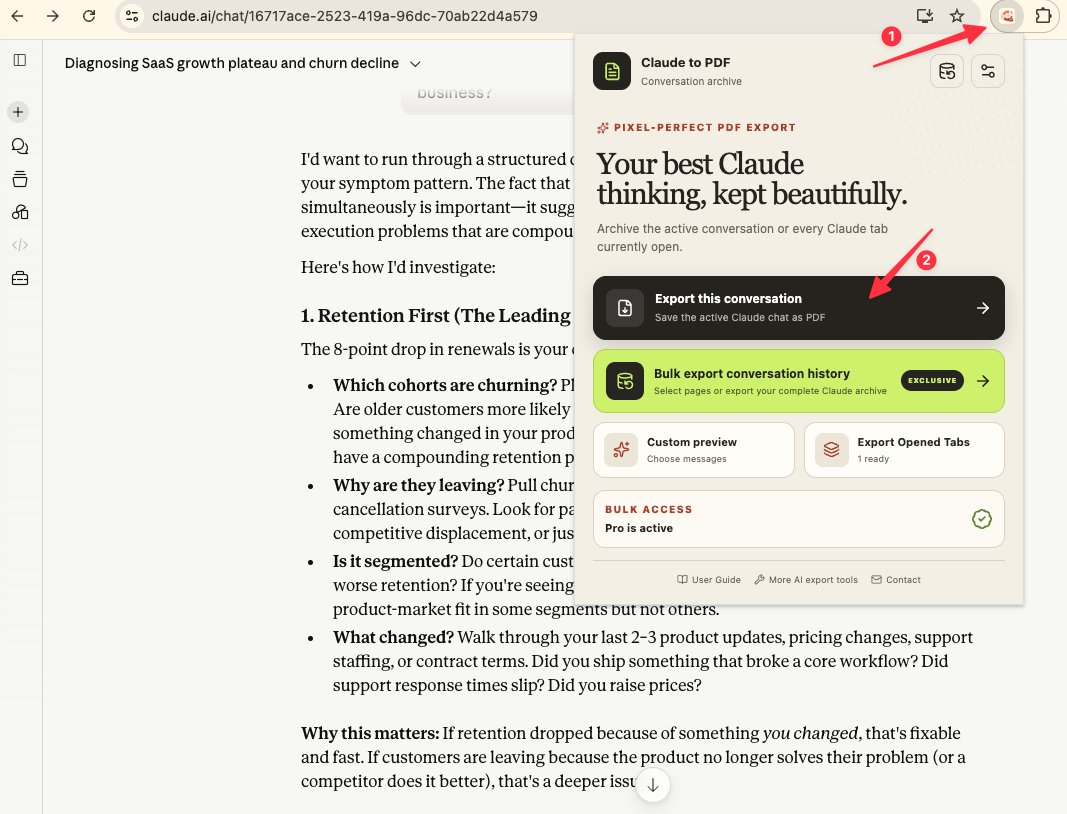
The popup should show the active export actions. If it cannot see Claude, refresh the Claude tab once and reopen the popup.
Why Chrome requests these permissions
Debugger
Chrome exposes its local print-to-PDF command through the debugger API. A temporary debugging notification can appear during export and disappear afterward.
Downloads
The extension needs download access to save the PDF and any supported conversation assets into the folder you configured.
Storage
Chrome local storage keeps preferences, daily usage, export progress, recent export results, and duplicate-export records.
Access to claude.ai
The extension reads conversation data from the signed-in Claude session already open in the browser.
Recommended Chrome download setting
For multi-file exports, open Chrome download settings and turn off Ask where to save each file before downloading. Otherwise Chrome can interrupt a batch run with a save dialog for every file.
Next step
Use One-Click & Open-Tabs Export for a first archive, or open Custom Preview when you want to trim the conversation.
Ready to try Claude To Pdf?
Open the product page for feature details, screenshots, pricing, and the Chrome Web Store install link.