
Free Plan, Premium, and Email Activation
Understand the Perplexity to Notion v3.2 free batch quota and activate Premium from Batch Export
Current Free Plan Behavior
In v3.2:
- Current-page Save to Notion remains available.
- Batch Export is limited to five successful items per day.
- A batch selection larger than five is reduced to the allowed first items.
- Successful one-click and batch saves contribute to the daily counter used by free Batch Export.
Premium removes the batch restriction.
Open the Activation Form
The popup shows a compact Free Plan status with Upgrade and Activate. Activate opens Batch Export, where the full Subscription Status card lives.
- Open the popup.
- Click Activate, or open Batch Export.
- Expand Subscription Status.
- Enter the exact purchase email.
- Click Activate Subscription.
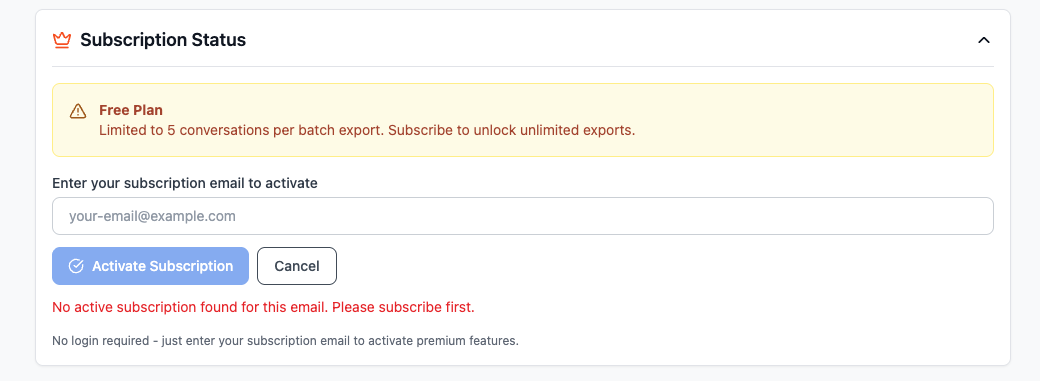
The Free Plan card explains the five-conversation batch limit and provides subscription activation.
Successful Activation
After verification, the card displays:
- Subscription Active
- Unlimited export message
- Activated email
- Re-activate with Email
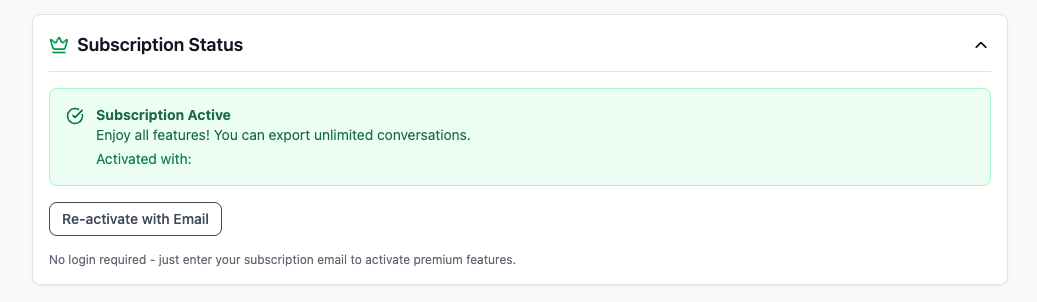
After verification, Subscription Status confirms that unlimited batch export is active.
The subscription result is cached in Chrome and refreshed by the extension. No separate account password is required for email activation.
If Activation Fails
No active subscription found
- Use the exact checkout email.
- Check spelling and aliases.
- Confirm the order is active.
- Wait a few minutes after purchase, then try again.
Error checking subscription
- Check the network connection.
- Reopen Batch Export.
- Retry after a short wait.
- The extension falls back to a cached result when one is available.
Premium is active but Batch Export still stops
- Reopen Batch Export and expand Subscription Status.
- Click Re-activate with Email.
- Verify with the purchase email again.
- Confirm the page shows Subscription Active before starting the run.
Privacy
The purchase email is sent to the subscription-verification service and cached in Chrome for activation checks. Do not include a real purchase email in screenshots or public troubleshooting files.
Ready to try Perplexity To Notion?
Open the product page for feature details, screenshots, pricing, and the Chrome Web Store install link.